Video posting now enabled
Insurance salesmen
A note or two about navigation
The way the blog appears sometimes depends on the browser you use. The blog may respond differently to your smartphone than to your desktop. So don’t get too excited if it navigates a little different to the way it worked the last time.
Typically, you should get a large group of the latest posts, last on top. You just scroll down to the last one you read and work your way up. Simple, huh? Some of the earliest posts (February) are not shown. The earliest posts are in the “archive” (by month) grouping that you can select on the right. To get back to the regular view, select the “uncategorized” selection, also on the right. Simple, huh? Oh, I’ve changed my mind and enabled HD video mode. You’ll hear, see, more about this later…
SECRET PASSWORD
Congratulations for finding my blog. The secret password is “WordPress”.
USB ON-THE-GO ADAPTER FOR ANDROID DEVICES
In the photo below you see an OTG adapter that works with my Samsung Galaxy Tab 2. One side plugs into the 40-pin charging connector on the bottom and the other end provides several USB functions such as thumb drive hosting and wired or wireless keyboard hosting and wired Ethernet adapter hosting and (separately-powered) USB hard drive hosting. I also show a wireless adapter for Logitech keyboards and mice. It’s that little thing the size of a dime. I got onto this OTG kick about 6 or 10 months ago, but I suspect that many of you have glossed over my comments because you didn’t see one or have one. Long ago you “learned” that USB didn’t work just because you had a connector. Well, in some cases this $10 adapter is all that is needed to get a lot more usefullness out of your phone or tablet. They need to be at least Android 3 and the manufacturer needs to have “turned on” the function. You’ll have pretty good luck with Samsung, Google, Apple devices and some others. Also, parenthetically, you could, if you’re the brave sort, install an alternate operating system for someone like Cyanogenmod and have access to more Android features on your device. In my case, it’s really handy to connect directly to my high grade camera (Canon 5D Mark 2) and be able to blog with a photo just taken or send such a photo by email with little fuss with the camera card reader (which also works). I hope this clears things up about what an OTG is. Honest, I’ve been talking about it for the better part of a year. To get one, Google your device name and “OTG” and see if Amazon sells one. The ones that adapt form a mini or micro USB to a regular USB (and are an OTG adapter) are the most common. All seem to work the same, so cheapest is probably just fine. You won’t know which features work until you try it, so you could be “out” the ten bucks. The manufacturers often don’t say 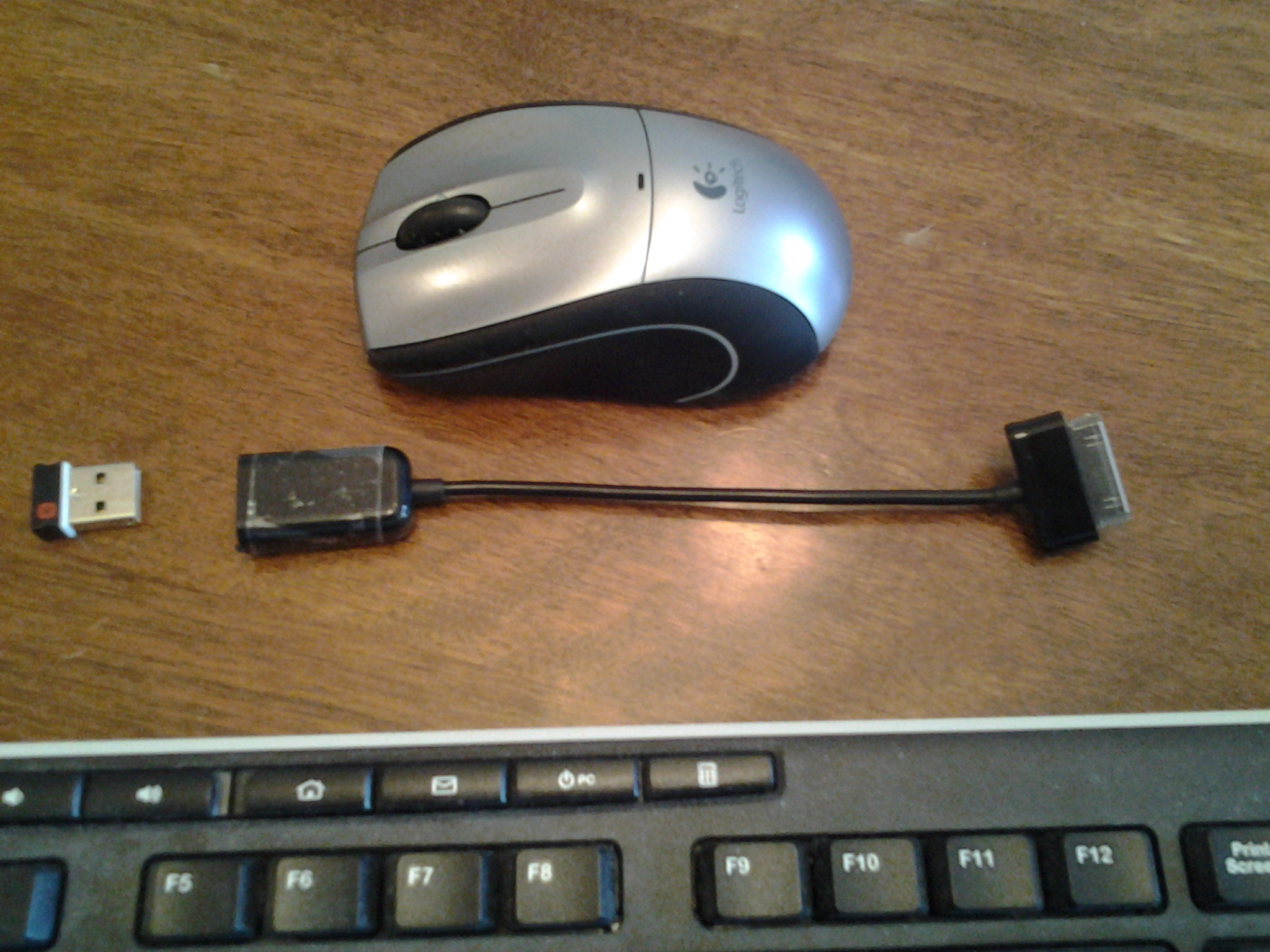 anything about it.
Breakfast post
I’m at a local breakfast place. I am testing the “hotspot” capabilities of my phone plan. It works fine. I am
Continue reading →
Consider the plan
As I’ve said in years past, the Oracle has spoken and it is just a matter of time before video takes over many of the functions that previously have been the domain of still photography. So it is important to explore video just to stay on top of it. My heart is mostly into still photography, but movie segments are better for waves on the shore, swaying palm trees, surfers, fireworks and chasing fish underwater.
I can publish these somewhere, but probably not on WordPress. These are just a fraction of what I’ll be photographing, so don’t despair.
For underwater fish, I would need a GO PRO camera, but Santa didn’t bring me one for Christmas. For the rest, my Nexus 4 phone takes okay videos, my Galaxy Tab 2 10.1″ takes pretty good videos and my Canon 5D Mark 2 takes pro-quality videos, so I won’t be left bare-handed.
I have purchased a micro tripod called a “cowboy” tripod for still or movie shooting of beach and fireworks. As it turns out we will be on the other side of the island the night of the fireworks, anyway. But if they’re going the night before, I’ll grab it. I’ll let you know if a tabletop tripod works or not. There shouldn’t be any whales this time of year, so I don’t think I’ll buy a lens extender and sit by the shore, waiting.
I will maybe have enough reason for long lens shooting that I have purchased a very lightweight monopod for this trip. This one is sold under many names but this one is branded Vivitar. It is mostly for surfers and the occasional sailboat on the horizon. It might help while watching sea turtles from a distance, such as at Blowhole down on the south of the island outside of Poipu.
A monopod works well with an image-stabilized modium or long lens for photographing plans in the botanical gardens, like the one down south or the one that I haven’t tried up on the north close to Tunnels Beach (Bali Hai).
I don’t know if I’ll be in the mood for drive up to the little grand canyon, but my ohotos for there in past years were disappointing. There is sort of a make shift indigenous plant exhibit that I have kept tabs on in years past with plants that are, err, out of this world. They look a little like something from another planet, so that intrigues me.
The North Shore condo will have both a sunrise and sunset view from inside. That should be a good time to try out the tripod. I will probably experiment with High Dynamic Range photography there. HDR needs a tripod anyway because it needs several photos to be overlaid on each other to capture the darks and the highlights.
No such luck for video posts
Video posting in WordPress costs $60 so it will be photos only.
If I make a video of fireworks l will have to post it elsewhere.
WordPress for Android
I downloaded WordPress for android 2.3.3 to my tablet and my phone. I am using the tablet with the OTG (usb hosting) adaptor connected with the Logitech wireless adaptor plugged in. This means I can type on the Logitech keyboard and use the wireless mouse. With the WordPress app fired up I am adding this post. The tablet is connected via N WI-FI. I’ll try to add a photo from something on the tablet. I would be able to upload a photo or video directly from the phone using this app, also.Since I don’t have much control over facebook, I like this social media method better.

So there you go, a picture of my coffee cup and a view of my super wide angle 17-40mm zoom. I pplan to shoot some sweeping coastline photos with that.
Continue reading →
KEYBOARD FOR TABLET
Just realized that I already had a USB-OTG adaptor for my Galaxy Tab 2 10.1″ tablet. It cost about 5 bucks. I plugged the universal Logitech USB adaptor and the Logitech keyboard and mouse work flawlessly. I’ll just throw them in the suitcase for my trip.
Having a good keyboard is like having good coffee — a necessity. This will raise my sense of “havingness” immensely. As it turns out, the tablet works fine for a “screen” and it works fine (as I am doing now) for making blog entries. The mouse is surprisingly useful for typing- type applications. Gotta go.
A note about Google maps
As you know, it would be cool to use Google Mapsl as an occasional GPS for car navigation in Kauai. In later versions of the operating system (ICS 4.1, and Jelly Bean ) the Google maps have the ability to download maps for an area. I upgraded someone’s Galaxy Tab 2 10.1 from ICS 4.0 to Ice Cream Sandwich 4.04 and the Google map would now show the option to download maps for offline use. This is cool in Kauai because there are places with no data coverage. You are asked to select the area to download and I selected a map of Kauai. It was about 20 MB and took a minute or two on my WI-FI. You could, of course do this at Starbucks or McDonnalds in a pinch if in an area of weak coverage or if you use no data plan. Of course you’d not get the up-to-the-minute traffic, but still have a GPS function and your cell phone would know the hotels and gas stations in the area. Hats off to Google Maps for this latest update.
 DEANLAVOIE.COM