HOW TO HOOK UP WESTERN DIGITAL MY BOOK AV 1 TB DVR EXPANDER to COMCAST HD-DVR
Check that your model is compatible on WD web site.
Buy drive from WD.
plug in drive to power.
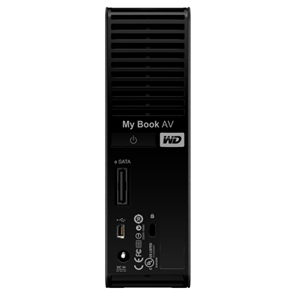
Plug supplied eSATA cable to drive and Motorola DVR.
Immediately tv screen asks if you want to format (yes).
Wait 5 seconds.
Use. Everything works the same. Drive will only work with the one dvr that it is “formatted” for.
Increases storage space by about ten (240 hours of HD).
LATEST 10 INCH TABLET
Large tablets are continuing to be popular. I, personally, like the largest size and skip the 7 inch size. Your preferences may vary……
The latest Samsung Tab 10.1 Pro should hit Amazon in a few weeks in the $500 range. It has a superfast processor and graphics card and super-dense display and an expansion slot for an additional flash card. It should have Android 4.3 Kit Kat, which is appropriate for 2014.
The rumors of the similar Nexus 10 upgrade model are just that, rumors.
So, if you’re buying soon this new Samsung model can’t lose.
Nexus is talking about an 8 inch model. Not sure if it would come before the next 10 inch Nexus. The Nexus models usually are consiiderably cheaper. The Apple models are always top dollar. The recent (last 6 months) Nexus 7 is a great deal for many fans of 7 inch tablets, at less than $200, with very recent software.
DVR IN THE CLOUD?
The Boston area Comcast customers are testing a DVR with no hard drive that stores movies in the cloud and streams them on demand. Tivo is coming out with a semilar device. This is significant. I’m not sure how long it will take to get the bugs out. My best guess is a couple years to reach Portland. My guess is the recorded data goes from some sort of hub and is ” flagged”as being recorded by you. So Comcast stores one original for multiple ( thousands) of subscribers. When requested, the origiinal is streamed to the requester. I’ll have to work out in my head how this is different from “ON DEMAND”. To recap, the DVR is a database and a fancier streaming center and a fairly cheap box connected to your TV. This is my first guess.
ADDING STORAGE CAPACITY TO YOUR COMCAST DVR IN THE PORTLAND AREA
This information comes from two sources. You can get a lot of old info if you just google it.
If you are on Comcast, you’ll have to log in to read the following Q&A page:
http://customer.comcast.com/help-and-support/cable-tv/external-dvr-storage-faqs
Has the statement:
“Answers to frequently asked questions about your new My Book AV DVR Expander, Western Digital’s external hard drive that has been tested and approved to work with Comcast DVRs.”
On the Western Digital website search the list of compatible devices (by TV provider, Make, and model. (Comcast, Motorola, DCT3412i)
For added insurance check if the provider area (Portland) supports external DVR storage (I think Portland does).
Don’t get one bigger than 1 TB. Larger ones won’t work at all.
The gist of it is that it’s easy to add 240 hours of recording time. Once the drive is plugged in to the DVR, the DVR asks to reformat the new drive. You do that. The new drive is “married” to that particular DVR, now. You can only play the recordings on that physical DVR. You can’t move the recordings to another DVR and if you replace the DVR you have to reformat the drive to use it again. There is some sort of utility build into the DVR to disconnect and lose the recordings if you remove it, so keep the connections stable. Otherwise the same DVR display shows approx. 250 things recorded instead of around 25.
There are “better” ways to do it, I suspect, and (heaven knows!) more complicated or less legal ways to get massive storage, but this is so simple that just about anybody can do it.
As a comment, this has been a pain for some time because of the content-protection concerns. I think they came up with a decent compromise
.
Today, the $99 price on the WD site is as low as it gets and includes shipping. I “you gotta have it now”, go to Best Buy and be recording HALF PIPE events to your heart’s content tonight (Olympics). This same gadget has other purposes not mentioned here, like plugging it into an X-Box or TV or maybe a media box. But I’m talking DVRs today.
4 K HERE WE COME !
Overview:
Digital movies were promised years ago. The promise was 2K digital movies (roughly 2000 pixels wide), followed by 4K (4000 wide) to come after that. The content would be “delivered” to the movie house by secure digital feed (over the Internet or by satellite feed) and stored temporarily (on hard disk) at the theater.
This is pretty much the case with places like Cinetopia, here in the Portland area. I’m not sure how the movie is delivered to the location but it is stored on a hard disk and the disk (the “film”) is put into the 4k projector, which is a DLP device. “DLP” is digital light projector. It uses digital micro-mirrors to form the image. So you can have a very bright light source for a bright screen. It is a projector like you would use for a business meeting, with a screen.
For smaller screens, like a home TV, you can get more brightnessl and far less complication by using a flat-screen LCD or plasma panel. The lowest power being the LCD.
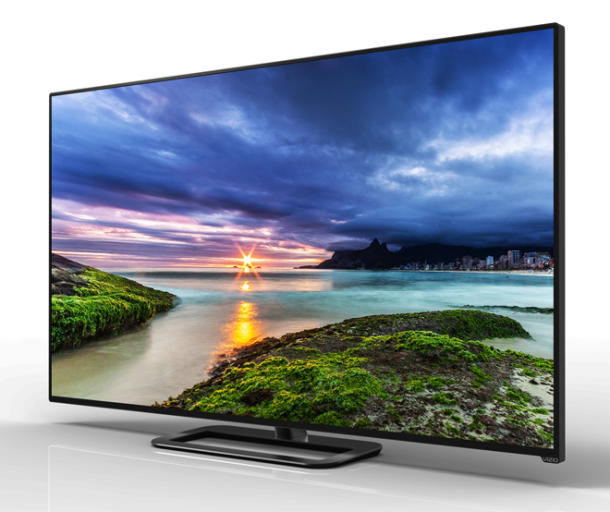
The latest rage is the upcoming transition to 4k resolution for the home TV. This year at the recent CES (new consumer products show) Vizio showed off a 4k 50″ LCD for $1000. They also had a 65 and a 70 inch model. We can consider this the opening salvo to begin the 4k wars in the coming years. The Vizio models are called the P series. The have 64 zones of variable LED backlighting (the premium way to get exceptional brightness range) and a quad-core processor for the screen image and, reportedly, an extremely high rate of image update, and 5 HDMI 2.0 inputs with HDCP 2.2 (the latest) compliance and (whatever it is) HVEC hardware decoding for 4k streaming. This keeps it compatible with Netflix and Amazon. There are engines for upconverting the image and sharpening it. It also “supports 802.11ac Wi-Fi, with “dual-band MIMO support for UHD streaming.” (I’ll get into WI-FI later.)
There are more features, but I want you to know this is a lot of stuff that will be “good enough” to serve as your next TV for the foreseeable future. This set costs about twice as much as the cheapest model 50″ LCD without any of these features and it looks like the incremental price change for a 50″ set with similar features is, maybe $200. This is HUGE.
The result is that by Christmas, the (“old fashioned”) 1080P sets will plummet is price and the battle will be on for the 4K sets.

TETHERING WITH TM $30/M0 PLAN ON NEXUS 5 WITH ANDROID 4.4.2
This is to use your Nexus 5 as a wifi hotspot on occassions when no wifi is available for your laptop or tablet but your cellular data plan from T-Mobile is working and that plan is the cheap one, the T-Mobile $30/mo plan, which dosen’t work with the Nexus 5. (The Nexus 4 will do this without modification.) You would have to “root” the phone. I recommend Nexus Root Toolkit (NRT) to root the phone. Then you have to modify a file in the “root” directory that tells T-Mobile that you are tethering (and would prompt you with a popup to pay them more money if you are using the Nexus 5). You also have to change your APN from ipv6 to iv4/ipv6. I know this all sounds like gibberish. This post is not a “how to”, just a statement of a workable path to accomplishing this task. It can be done and didn’t take much time THIS TIME.


 DEANLAVOIE.COM